




As of July 2026, Google Ads is operating under new terms of service, the very first update… in 8 years!
What it says is quite simple: AI can now generate your targeting, your ads, and your destinations on your behalf, but you (the advertiser) remain fully responsible for what it creates.
This isn’t just a tiny legal tweak. It’s an actual shift in advertising governance, and it has a straight impact on any business currently running ad campaigns.
To help you make sense of it, our PPC agency in Montreal broke down the situation.
Here’s exactly what’s changing, what it means and what to put in place as of now in order to remain compliant 😉
What’s Changing in Google Ads’ Terms of Service (as of July)
The updated terms clarify that Google can now serve ads through automated features that format, select or generate targets, ads or destinations on the advertiser’s behalf.

In practice, this mainly covers the authorizations and responsibilities tied to:
- Inputs provided through Google Ads’ conversational tools
- URLs used for automated campaign setup
- Website content crawled with permission to support automatic generation
Basically, a growing share of what Google Ads’ AI produces can now come from content that is generated, pulled or assembled automatically, without a human necessarily reviewing every element before it goes live.
It follows the same direction as Google Ads June Updates: ad automation is being pushed even further, as more and more pressure is being put on advertisers to control what actually gets published.
Who’s Responsible If AI Gets It Wrong?
Google Ads’ new terms don’t change the interface or the tools you already use. What changes is the accountability line for AI in paid marketing: Google can generate, but you have to supervise, document and take responsibility for the outcome.
A weird sales claim? A fake discount? Who’s at fault if an AI-generated ad goes off track? The advertiser who owns the assets? The agency that enabled campaign automation? Or Google, since it generated the copy in the first place?
You can see how that could get messy fast… Not anymore!
It’s now spelled out clearly: if Google’s AI runs wild and generates a misleading, irrelevant or trademark-infringing ad, it’s legally your responsibility, not Google’s.
Yes, you read that right.
The advertiser remains fully responsible for reviewing, approving and removing automatically generated campaigns and assets.
In other words, “AI made the mistake” or “the algorithm got it wrong” are no longer valid defenses (not legally, and not in front of a client questioning ad spend).
Google Is Passing the Hot Potato Back to Advertisers After Losing in Court
Google is strengthening its legal shields to protect itself from waves of large-scale lawsuits and meet new expectations from regulators around the world.
It’s a little ironic, but very strategic.
In 2024, AI Overviews became a punchline after telling people to put glue on pizza…
But things got more serious in June 2026, when a German court officially held Google responsible for false and defamatory claims generated by its AI Overviews (the algorithm completely hallucinated by falsely accusing two companies of being involved in fraud and scams).
With these new advertising terms, Google is building the perfect defense to avoid the same kind of liability on the paid media side… by making sure the hot potato lands back in advertisers’ hands.
Your New Obligation: Document Monthly Costs Generated by AI
This shift also comes with another important obligation: a transparent monthly spend report must now be provided to end clients.
For agencies and in-house marketing teams, that means documenting what AI generates more rigorously, not just what a human configures manually.
💡 No immediate action is required for the new terms to apply, since they’re already in effect. What needs to change is the way campaigns are supervised.
Best Practices to Stay Compliant
Alright. You get the issue, but you’re not quite sure where to start?
Good news! We put together a few tips based on all of this ✅
Here are our 5 tips to survive Google Ads’ new terms of service:
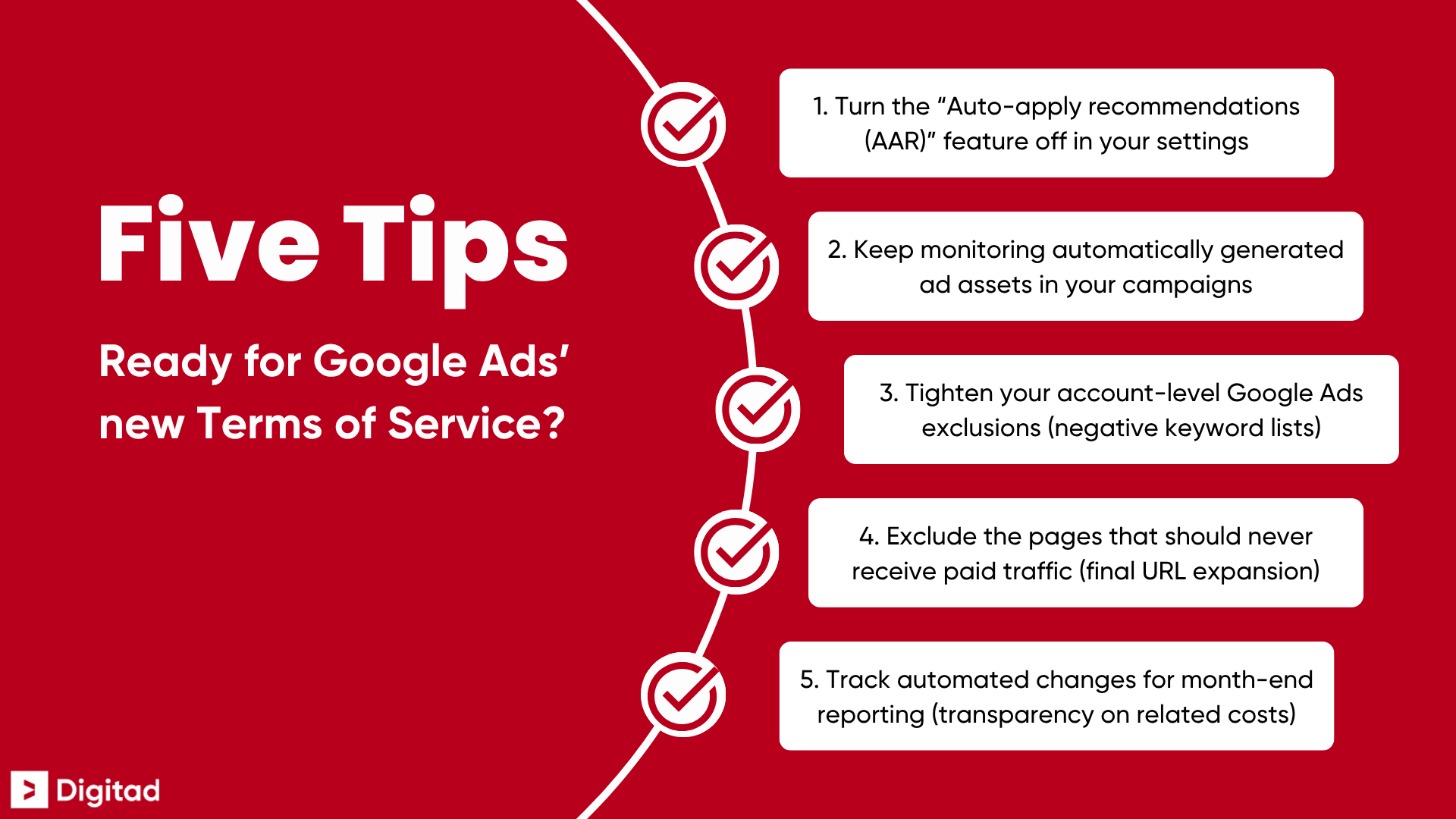
Let’s take a closer look… 🔍
Tip 1: Turn Off Auto-Apply Recommendations (AAR)
Go to the “Recommendations” tab in your Google Ads account, then remove the automatic application of keyword additions, ad creation and asset changes.
The goal is simple: prevent AI from applying changes without human review (and make sure AI-generated targets, ads and destinations are reviewed before they go live, not only after an issue gets flagged).
Tip 2: Keep Monitoring Automatically Generated Ad Assets
Don’t just look at the performance of your active campaigns. Check their asset reports too, so you can spot copy, images, headlines, descriptions, sitelinks or other elements generated automatically by Google’s AI.
Turn off anything that doesn’t match your brand, your offer, your internal rules or the claims you’re willing to stand behind publicly.
💡 Pssst… To make tracking easier, use your next Google Ads audit to sort through your AI assets and see which ones to keep, fix or turn off (so you can spot new problematic elements faster later on).
Tip 3: Tighten Your Account-Level Google Ads Exclusions
Create negative keyword exclusion lists to prevent AI from bidding on competitors, overly broad queries, sensitive terms or irrelevant searches.
It’s a concrete way to stop automation from triggering unnecessary spend in your Google Ads campaigns.
Tip 4: Lock Down Final URL Expansion
If Google can use your website to generate ad destinations, exclude the pages that should never receive paid traffic (like legal pages, test pages, expired pages, out-of-stock products or non-strategic content).
That way, you protect your Google Ads budget instead of sending it to pages with no real advertising value.
💡 This is especially important if you want to optimize your Google Shopping campaigns, where one poorly chosen destination can quickly send budget to a page with little to no commercial value 😅
Tip 5: Track Automated Changes for Month-End Reporting
The new terms require a transparent monthly spend report to be provided to end clients, which means automation-related costs need to be easier to trace.
Add an “Automated changes” section to your monthly client reports. Document what the algorithm tested, generated, modified or turned off (instead of having to rebuild the history after the fact).
AI Is Still Just a Copilot… Take the Wheel of Your Google Ads Campaigns!
Artificial intelligence is still a powerful engine for improving ad performance, but it’s only a copilot… You need to keep your hands on the wheel of your Google Ads campaigns if you want to avoid a crash!
That makes this the right time to audit your automation settings (or ask your digital marketing consultant how they handle that supervision if you’ve handed them the wheel 😉).
👉 Looking for a team of experts to take the wheel and help you regain full control of your Google Ads campaigns? We’ve got what it takes to look under the hood, secure your budgets… and fuel your growth! Contact our digital marketing agency in Montreal for a free assessment 👀

