
Generating an image in 4 seconds for $0.034? Yep, it’s possible! (That means $5 US gets you almost 150 images 🤯).
No, that’s not a typo.
That’s the new standard Google just set with Nano Banana 2 Lite 🙌
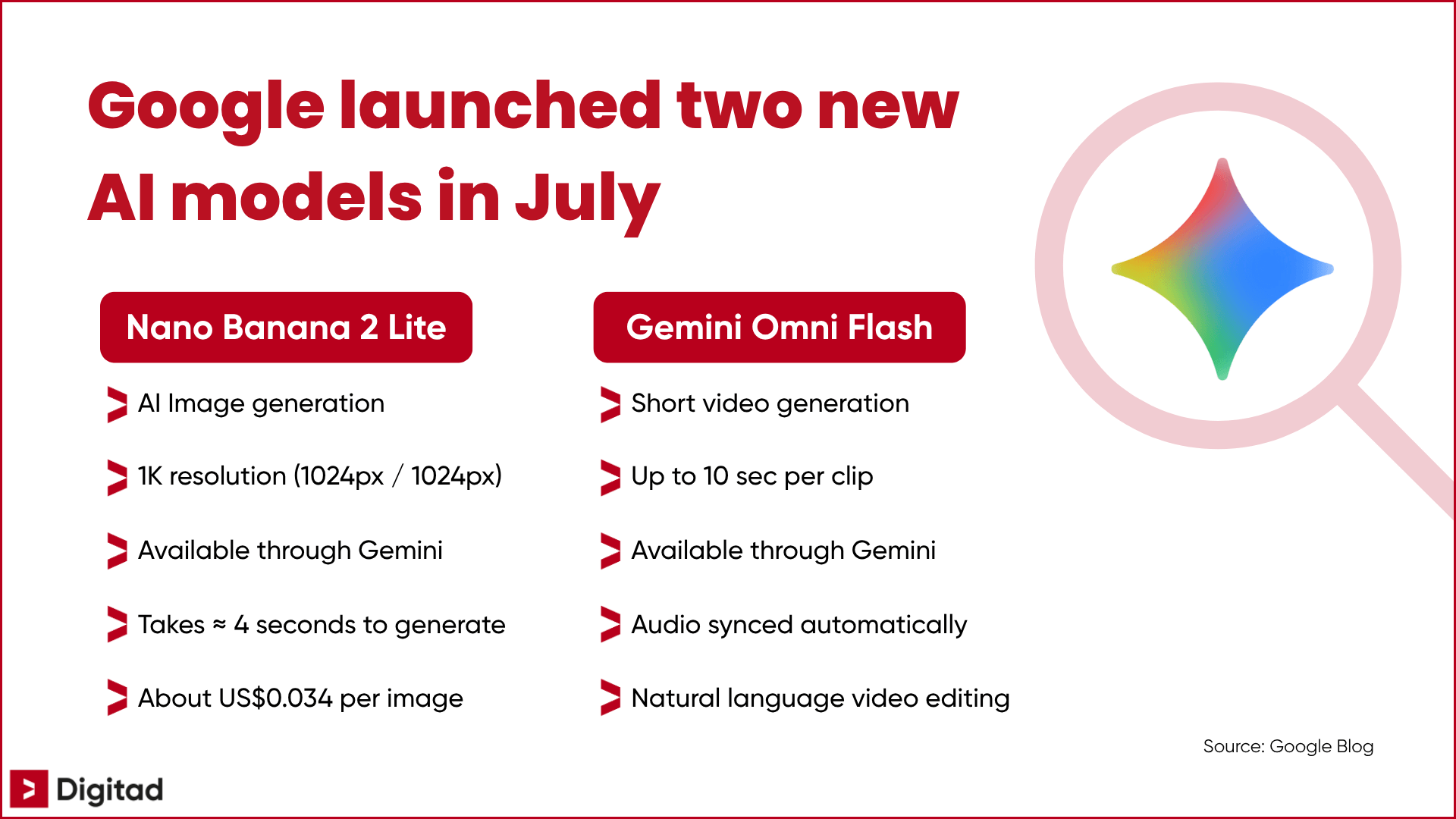
On June 30th, Google launched Nano Banana 2 Lite (ultra-fast, affordable image generation) AND Gemini Omni Flash (conversational video editing: change a background, outfit, or lighting style just by writing it out).
For teams juggling limited budget, limited time, and limited design resources, this is worth a closer look.
So that’s exactly what our content marketing agency did!
What Are Nano Banana 2 Lite and Gemini Omni Flash?
Google just added two new creative building blocks to the Gemini ecosystem: one model designed to generate images faster and at a lower cost, and another designed to create or edit short videos in natural language.
Let’s take a closer look… 🔍
Nano Banana 2 Lite: Generate Images Faster, for Less
Nano Banana 2 Lite is an ultra-fast, low-cost version of Google’s AI image generation model, built on Gemini 3.1 Flash-Lite.
Two concrete improvements come with Nano Banana 2 Lite:
- consistent characters from one image to the next
- readable typography built directly into generated visuals
Two common AI image generation headaches, fixed in one shot.
In fact, it can generate an image in 4 seconds for $0.0336 USD per 1K image, meaning 1024px by 1024px (roughly $0.05 CAD/image).
That makes it especially useful for high-volume prototyping!
For Nano Banana images in general, this confirms that Google’s creative models are becoming fast and affordable enough to be used in real production workflows, not just one-off tests.
Gemini Omni Flash: Video Editing Becomes Conversational
Gemini Omni Flash, on the other hand, gives developers access to Google’s video generation and editing tool through the Gemini API.
Its standout feature: conversational video editing, which lets you modify an existing video (change a background, outfit, or lighting style) simply by writing it in natural language, with automatic audio synchronization.
Here’s an example of a video generated with Gemini Omni Flash:
That means a team can generate a reference image with Nano Banana 2 Lite, then bring it to life with Gemini Omni Flash by simply describing the scene, movement, or mood they want, all without leaving their Gemini chat.
One current technical limit is worth keeping in mind! Clips generated with Gemini Omni Flash are, for now, capped at a maximum length of 10 seconds.
Best Practices for Making the Most of These New AI Models
Knowing these tools exist is one thing. Knowing how (and when) to use them well is another.
So we rounded up the reflexes worth keeping if you want to turn quick tests into useful creative directions for your business.
Here’s 7 concrete ways to put these two new releases to work:
- Use Nano Banana 2 Lite to quickly prototype visual concepts before committing to a more expensive creative direction
- Explore low-cost product staging, a particularly relevant use case for small teams without in-house design resources
- Test Gemini Omni Flash’s conversational editing on short content (under 10 seconds) instead of long-form formats, to stay within the current technical limit
- Keep a critical eye on brand consistency, even when generation is fast and affordable. Speed doesn’t replace a clear creative direction
- Use the improved consistency from one image to the next to test a mascot, spokesperson, or mini-series of coherent visuals
- Mock up visuals where text is part of the concept, like ads, article covers, or social posts, while taking advantage of more readable generated typography
- Use a reference image to generate a short video in natural language, for example by animating an already-approved product scene
Now, let’s see how these AI models stack up against other popular options… 👀
Mini-Guide: Which AI Should You Use for Content Creation? (Comparison Table)
Not sure which model to start with for your content creation? 🤔
No stress!
A digital marketing consultant on our team compared 12 of the most popular AI models in 2026 and grouped everything in the table below:
| AI model | Budget-friendly | Enterprise volume | Create fixed image | Edit image | Accurate text in image | Create video | Native video audio | Branding preserved | Use 1 reference image | Use multiple reference sources | Beginner-friendly | Best for marketing / SMEs |
|---|---|---|---|---|---|---|---|---|---|---|---|---|
| Nano Banana 2 | 👀 Depends | ✅ Yes | ✅ Yes | ✅ Yes | ✅ Yes | ❌ No | ❌ No | 👀 Depends | ✅ Yes | ✅ Yes | ✅ Yes | ✅ Yes |
| Nano Banana 2 Lite | ✅ Yes | ✅ Yes | ✅ Yes | ✅ Yes | ✅ Yes | ❌ No | ❌ No | 👀 Depends | ✅ Yes | 👀 Depends | ✅ Yes | ✅ Yes |
| ChatGPT — GPT Image 2 | ✅ Yes | 👀 Depends | ✅ Yes | ✅ Yes | ✅ Yes | ❌ No | ❌ No | 👀 Depends | ✅ Yes | ✅ Yes | ✅ Yes | ✅ Yes |
| Midjourney | 👀 Depends | 👀 Depends | ✅ Yes | ✅ Yes | ✅ Yes | ✅ Yes | ❌ No | ✅ Yes | ✅ Yes | ✅ Yes | 👀 Depends | ✅ Yes |
| Stable Diffusion | 👀 Depends | ✅ Yes | ✅ Yes | ✅ Yes | 👀 Depends | ✅ Yes | 👀 Depends | ✅ Yes | ✅ Yes | 👀 Depends | ❌ No | 👀 Depends |
| Veo 3.1 | 👀 Depends | 👀 Depends | ❌ No | ❌ No | 👀 Depends | ✅ Yes | ✅ Yes | 👀 Depends | ✅ Yes | ✅ Yes | 👀 Depends | 👀 Depends |
| Veo 3.1 Fast | 👀 Depends | ✅ Yes | ❌ No | ❌ No | 👀 Depends | ✅ Yes | ✅ Yes | 👀 Depends | ✅ Yes | 👀 Depends | 👀 Depends | 👀 Depends |
| Gemini Omni Flash | ✅ Yes | 👀 Depends | ❌ No | ❌ No | 👀 Depends | ✅ Yes | ✅ Yes | 👀 Depends | ✅ Yes | ✅ Yes | ✅ Yes | ✅ Yes |
| NotebookLM | ✅ Yes | 👀 Depends | 👀 Depends | ❌ No | ✅ Yes | ✅ Yes | ✅ Yes | 👀 Depends | 👀 Depends | ✅ Yes | ✅ Yes | 👀 Depends |
| Canva AI | 👀 Depends | 👀 Depends | ✅ Yes | ✅ Yes | ✅ Yes | ✅ Yes | 👀 Depends | ✅ Yes | ✅ Yes | 👀 Depends | ✅ Yes | ✅ Yes |
| Grok Imagine Image | 👀 Depends | 👀 Depends | ✅ Yes | ✅ Yes | ✅ Yes | ✅ Yes | ✅ Yes | ✅ Yes | ✅ Yes | ✅ Yes | ✅ Yes | 👀 Depends |
| Seedance 2.0 | ❌ No | ✅ Yes | ❌ No | ❌ No | 👀 Depends | ✅ Yes | ✅ Yes | ✅ Yes | ✅ Yes | ✅ Yes | 👀 Depends | 👀 Depends |
The real question isn’t “which model is best?”, but “what are you making?” and “who is it for?”
In short, choose based on YOUR setup and YOUR needs.
Create More, Test Better, Spend Less
Nano Banana 2 Lite and Gemini Omni Flash won’t revolutionize content creation overnight, but they do significantly lower the cost and speed barrier for producing basic visuals and videos.
For small teams, that means more iterations with the same budget, and a better shot at getting a super solid result!
👉 Need a hand with your content creation? Our digital marketing agency in Montreal would be happy to help! Contact us for a free assessment 😉